TikTok Live · connect your account

AI hosts on TikTok Live — and where policy draws the line

TikTok Live is a real channel for AI hosts, with two hard constraints most vendors will not tell you about: a 1,000-follower gate, and a TikTok Shop US rule that bans AI voices on shoppable streams. Here is the honest map.

TwinTone AI live stream broadcasting to TikTok Live with real-time chat

The two rules that decide whether this works for you

1,000 followers to go live at all
TikTok requires 1,000 followers to access LIVE and its stream key. Below that threshold there is no RTMP route, for TwinTone or anyone else.
AI voices are banned on TikTok Shop US shoppable streams
Effective July 2026, TikTok Shop US prohibits AI-generated voices, pre-recorded audio, and radio-style narration in promotional livestreams and shoppable videos. Enforcement runs through your Account Health Rating, and sellers must keep 90 days of compliance records.
So what is left?
Non-shoppable TikTok Live — brand presence, entertainment, community, top-of-funnel — outside TikTok Shop US promotional surfaces. TwinTone does not run AI-voiced hosts on TikTok Shop US, and we will not help you do it.
Where the selling should happen
YouTube Live, Facebook Live, your own site, and your Shopify checkout. Run TikTok for reach and clips, and convert on a surface that permits AI hosts.

Sources: Verified August 2026 against the TikTok Shop US Academy AI-voice rule (published May 2026, effective July 2026), TikTok LIVE access requirements, and TikTok LIVE Center stream-key guidance. See our full breakdown, with sources, at the TikTok Shop AI voice ban explainer. Verify current rules in your own seller dashboard before you go live.

How it works

Three moves from signup to a stream that sells.

1

Check the two gates

Confirm you have 1,000+ followers, and confirm your intended stream is not a TikTok Shop US promotional or shoppable stream. If it is, use YouTube or Facebook instead.

2

Connect your account

In TwinTone, open Connect and authorise your TikTok account. Your creator, script, and stage carry over from your other channels.

3

Go live and clip

Your creator hosts and reads chat in real time. Every session auto-clips into short-form you can push back out as TikTok posts.

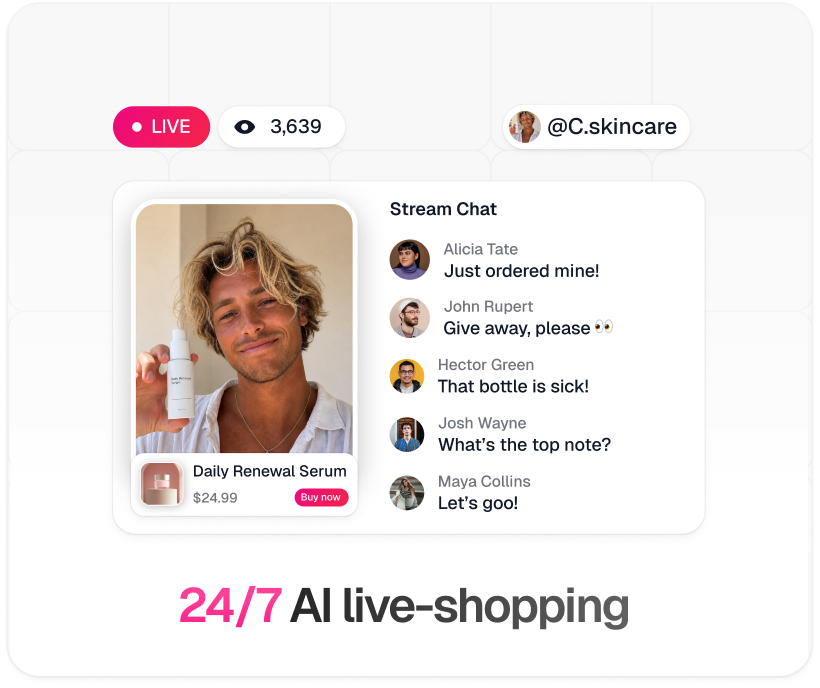
TwinTone 24/7 AI live-shopping stream: live badge, viewer count, pinned product with Buy now button, and real-time stream chat
Step by step

Your route to going live

Pick a path, then follow it top to bottom. Nothing skipped, nothing assumed.

1
Confirm your account has 1,000+ followers — this is TikTok's gate, not ours.
2
Create your TwinTone account and open Connect.
3
Choose TikTok Live and authorise your account.
4
Pick your creator and script, keep the stream off TikTok Shop US promotional surfaces, and go live.

TikTok Live is available on TwinTone's live-commerce vertical. iGaming operators cannot broadcast to TikTok.

1
Open TikTok LIVE Center on desktop and generate a fresh Server URL and Stream Key. Generate it immediately before you go live — do not reuse a key from a previous session.
2
In OBS, add your TwinTone stream as a Browser Source from your embed URL, then add your overlays.
3
In OBS, open Settings → Stream, choose Service: Custom, and paste the server URL and key.
4
Set video bitrate to at least 3,000 Kbps and start streaming.

TikTok LIVE Studio is the desktop alternative if you want TikTok's own scene tooling instead of OBS.

TikTok Live facts
Follower gate1,000 followers to access LIVE and stream keys
Stream keyGenerate fresh from LIVE Center before each session
Minimum video bitrate3,000 Kbps
Max stream lengthNo hard cap — continuous streaming is supported
AI voices, TikTok Shop USBanned on promotional and shoppable streams since July 2026
EnforcementAccount Health Rating; 90 days of compliance records required

Why brands run it this way

Straight answer on where AI hosts are allowed, instead of a claim that gets your account dinged
Same creator, script, and stage as your YouTube and Facebook channels
AI creator reads chat in real time and responds in under a second
Every stream auto-clips into short-form for TikTok distribution
Disclosure is default-on and locked, so the host never denies being AI
iGaming operators are blocked from TikTok in-product, not left to find out the hard way
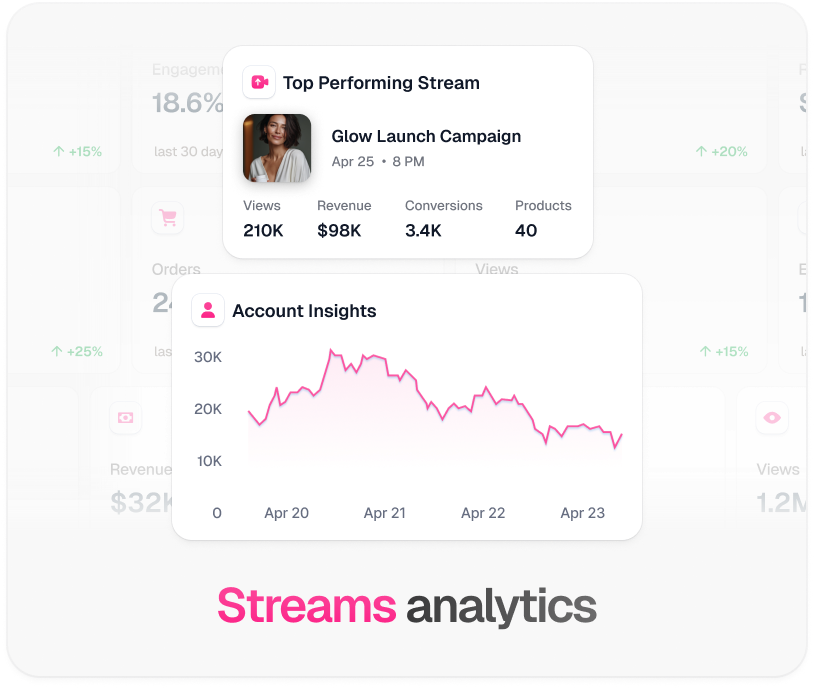
TwinTone stream analytics: top performing stream revenue, conversions, and account insights graph

Every platform TwinTone streams to

One creator, one catalog, one script — pointed at whichever surface your buyers are on.

TikTok Live FAQ

Can I use an AI host to sell on TikTok Shop?

Not in the US. TikTok Shop US banned AI-generated voices, pre-recorded audio, and radio-style narration in promotional livestreams and shoppable videos, effective July 2026. TwinTone does not run AI-voiced hosts on TikTok Shop US. Read the full breakdown at /tiktok-shop-ai-voice-ban.

Then what can I use TikTok Live for?

Non-shoppable presence: brand programming, entertainment, community, and top-of-funnel reach, outside TikTok Shop US promotional surfaces. Convert on YouTube, Facebook, or your own site, where AI hosts are allowed.

Why do I need 1,000 followers?

That is TikTok's requirement for access to LIVE and its stream key, not a TwinTone limit. Below that threshold there is no RTMP path at all.

How do I get a TikTok stream key?

From TikTok LIVE Center on desktop. Generate it immediately before going live rather than reusing an old one, and paste the server URL and key into OBS under Service: Custom.

Can iGaming brands stream to TikTok?

No, and TwinTone blocks it in-product. TikTok, Twitch, Facebook, and Instagram all restrict gambling content, so iGaming accounts only see YouTube and Kick as channel options.

How long can a TikTok Live run?

TikTok does not impose a hard cap, so continuous streaming is technically supported — subject to every policy above.

Use TikTok for reach. Convert where AI hosts are welcome.

We will map your channel mix on a call — including what to move off TikTok Shop.

Talk to us about your channel mix

TwinTone is not affiliated with TikTok Ltd. TikTok is a trademark of TikTok Ltd.