Real-Time Sentiment Analysis for AI Livestreams
How to build a futureproof relationship with AI
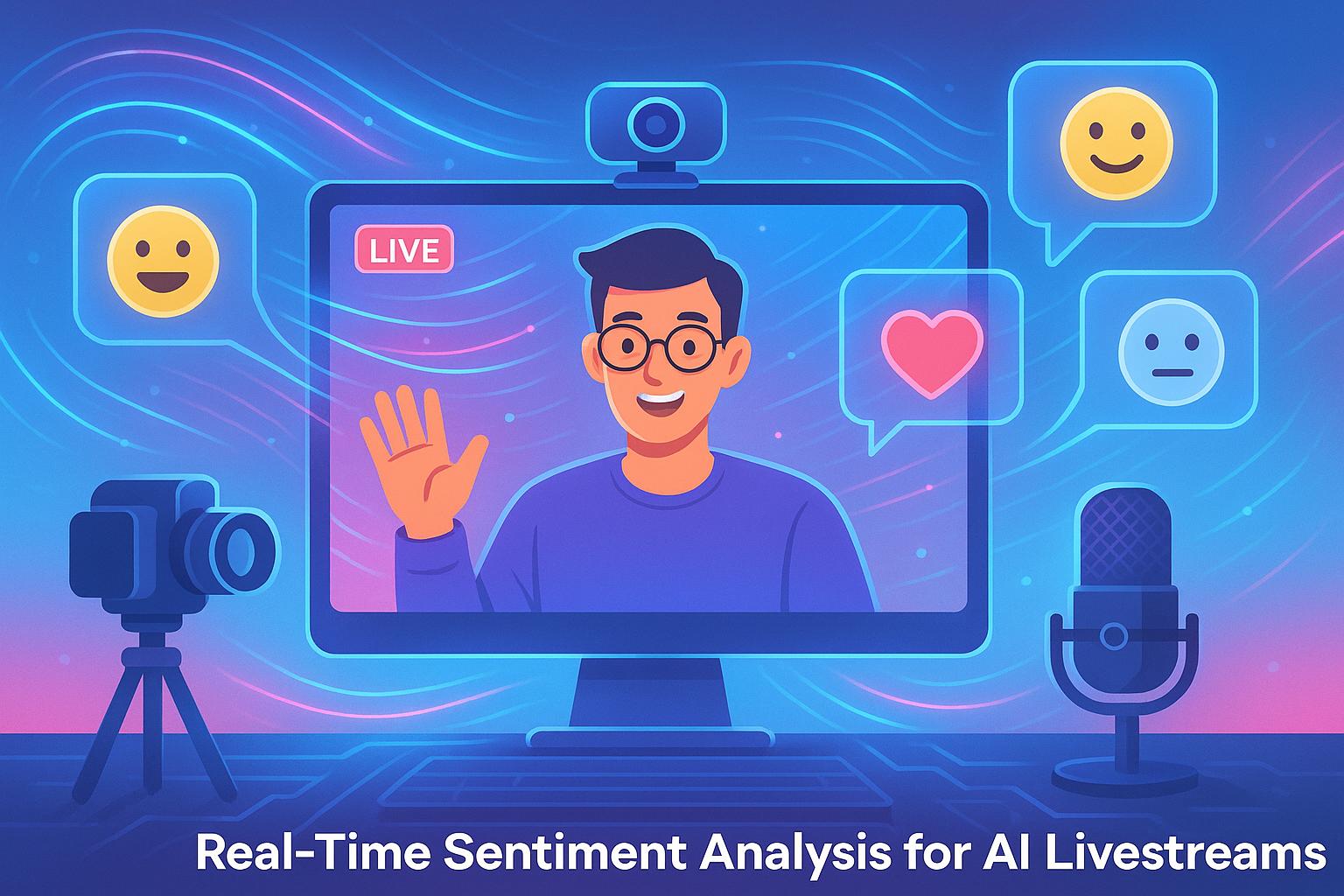
Real-time sentiment analysis transforms AI livestreams by analyzing audience feedback - like chat messages, reactions, and questions - in seconds. This technology uses natural language processing (NLP) and machine learning to classify sentiments (positive, negative, or neutral) and detect emotions or intent. Unlike delayed traditional methods, this system empowers AI hosts to adjust content, tone, or offers instantly, improving viewer engagement and conversions.
Key Points:
How it works: A 3-layer system collects live data, analyzes sentiment, and provides actionable insights in real time.
Why it matters: Immediate feedback helps AI hosts respond to audience emotions, boosting trust and sales.
Techniques: Combines lexicon-based tools, machine learning, and advanced models like transformers to process data quickly and accurately.
Applications: Platforms like TwinTone use sentiment data to create AI hosts that react dynamically, tailoring livestreams for better engagement.
Streaming Connect #3: Real-Time Social Media Sentiment Analysis Using RisingWave and StreamNative
Core Components of Real-Time Sentiment Analysis
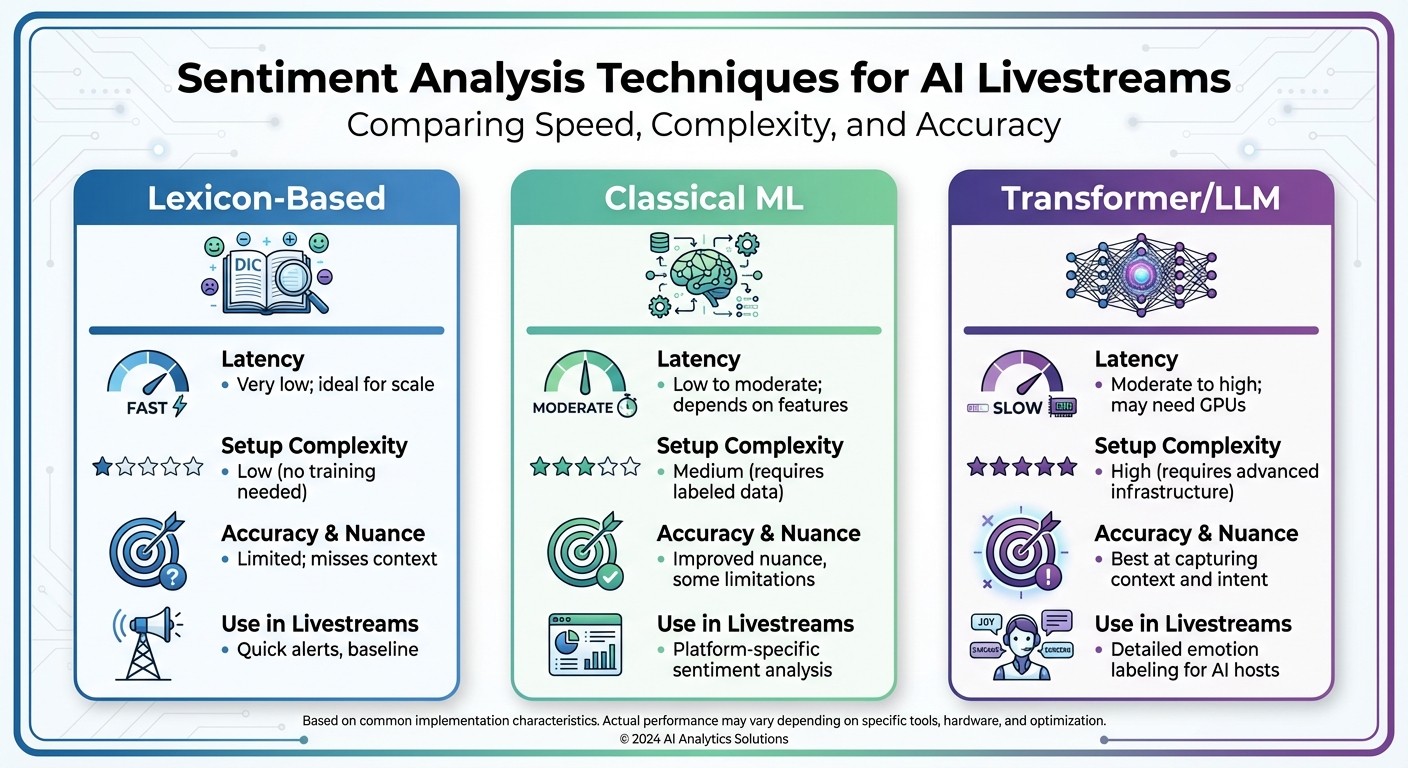
Sentiment Analysis Techniques Comparison for AI Livestreams
Real-time sentiment analysis systems work through three essential layers: collecting signals, interpreting them, and processing the data with minimal delay. These layers transform raw inputs - like chat messages and reactions - into actionable insights that enable an AI host to adapt dynamically. Together, they form the foundation for the adaptive behaviors explored in the next section.
Data Sources in Livestreams
The key data sources for sentiment analysis in livestreams include:
Text chats: Platforms like YouTube, Twitch, and Instagram Live provide a steady stream of messages, often rich in context but occasionally noisy.
Emoji and reaction streams: Signals like thumbs up, hearts, or angry faces offer high-volume, low-text insights with minimal delay.
Polls and Q&A tools: Built-in features that deliver structured, periodic sentiment snapshots.
Super chats or tips: High-value viewers often include messages with their contributions, adding another layer of sentiment data.
Beyond the livestream platform, external sources such as Twitter (X) mentions, Reddit discussions, and Discord conversations can provide a broader perspective on brand sentiment.
Each source comes with unique characteristics. Chat messages are frequent and context-heavy but can be cluttered, while emoji reactions are fast and straightforward. Polls and Q&As are structured but less frequent. For AI-driven, round-the-clock shows - like those on TwinTone - handling high data volumes and sudden spikes (e.g., during product demos or promotions) is critical. In such cases, fast in-stream signals like chat and reactions take priority, with external social mentions acting as supplementary inputs.
To standardize these events, use WebSocket or event-based APIs. Preprocessing steps include language detection, spam filtering, tokenization, and normalization of U.S. prices and measurements. Events should be standardized with fields such as timestamp, user ID, channel ID, message type, reaction type, and metadata. For commerce-focused livestreams targeting U.S. audiences, normalizing prices to USD (e.g., $49.99) and tagging measurement units (like inches or pounds) can enhance sentiment analysis for product discussions.
Sentiment Analysis Techniques
Three primary approaches are used for sentiment analysis in livestreams:
Lexicon-based methods: These rely on predefined dictionaries for quick sentiment scoring. While lightweight and fast, they often struggle with sarcasm, slang, or domain-specific expressions.
Classical machine learning: Techniques like logistic regression, support vector machines, or gradient boosting use labeled data for training. These models perform well for simple positive, neutral, or negative classifications but require periodic retraining.
Transformer-based and large language models (LLMs): These models excel at capturing nuanced emotions, understanding context, and handling sarcasm. However, they demand more computational resources.
Often, a hybrid pipeline is employed. A lexicon-based or classical ML filter processes most messages quickly, while transformers or LLMs handle ambiguous or high-value content.
Aspect | Lexicon-Based | Classical ML | Transformer/LLM |
|---|---|---|---|
Latency | Very low; ideal for scale | Low to moderate; depends on features | Moderate to high; may need GPUs |
Setup Complexity | Low (no training needed) | Medium (requires labeled data) | High (requires advanced infrastructure) |
Accuracy & Nuance | Limited; misses context | Improved nuance, some limitations | Best at capturing context and intent |
Use in Livestreams | Quick alerts, baseline | Platform-specific sentiment analysis | Detailed emotion labeling for AI hosts |
Additionally, emojis and domain-specific slang should be mapped to sentiment scores. For example, 👍 and ❤️ are positive, while 😡 or 👎 indicate negative sentiment. Livestream-specific slang like "L", "W", or "mid" often requires custom tuning based on historical chat data. Multilingual or mixed-language chats can be managed by detecting the primary language and applying language-specific models or multilingual transformers, defaulting to English for short mixed-language inputs.
Real-Time Data Processing
The process begins with a streaming ingestion layer (using tools like WebSockets, Kafka, or Kinesis) to capture live chat and reaction data. A processing framework then handles windowing, filtering, and stateful operations. Sentiment classification, toxicity detection, and intent prediction are performed using local models or APIs, all while keeping latency under 1–2 seconds. Aggregated data is sent to dashboards, alerting systems, and the AI host.
To manage message priority, implement distinct fast and slow processing paths. A storage layer, often built with time-series or columnar databases, retains scored events for real-time dashboards, experimentation, and post-event analysis.
The pipeline outputs processed insights to downstream systems, such as dashboards, alerting tools, and the AI livestream host (e.g., an AI Twin on TwinTone). This enables the host to adjust tone, pacing, or focus in real time based on sentiment shifts. Keeping latency below 1–2 seconds ensures immediate responses.
Rather than reacting to every message, the system aggregates sentiment over defined windows (e.g., 5–30 seconds) or a fixed number of messages (e.g., the last 100). Metrics like average sentiment score, positive-to-negative ratio, sentiment volatility, and share of voice for topics or products are calculated. Smoothing techniques help avoid overreacting to brief spikes. Threshold-based triggers - such as sustained negative sentiment or a sharp drop compared to recent trends - can prompt specific adjustments during the livestream. These insights empower AI hosts to fine-tune their interactions in real time.
Building Sentiment-Aware AI Livestream Experiences
With the foundation of a real-time data pipeline, AI-driven sentiment analysis is transforming how livestreams engage audiences. By leveraging sentiment data, broadcasts shift from one-sided presentations to interactive conversations. The AI host adapts its tone, pacing, and content in real time, keeping viewers engaged and encouraging actions like purchases or sign-ups.
How AI Adapts to Sentiment in Real Time
Unlike a scripted AI host, a sentiment-aware AI Twin reacts to live audience signals - such as chat messages, emojis, reactions, and watch-time trends. For instance:
Positive Sentiment: When sentiment scores rise above +0.5 and viewer numbers climb, the AI ramps up its energy. It might speed up its pacing, emphasize time-sensitive offers, or highlight customer reviews to capitalize on the excitement.
Neutral or Mixed Sentiment: In this case, the AI experiments with new formats like Q&A sessions, live polls, or shifts in product focus. It observes which changes spark engagement and adjusts accordingly.
Negative Sentiment: If sentiment dips below a certain threshold, the AI slows down, simplifies its messaging, and activates support protocols to address concerns.
For example, if sentiment falls below –0.3 for 30 seconds and chat activity drops by 20%, the AI might pause its sales pitch, ask clarifying questions, and restate the offer in easier terms. Platforms like TwinTone take this further, with AI Twins mimicking human-like behaviors - adjusting facial expressions, vocal tones, and talking points in real time. These dynamic adjustments not only keep viewers engaged but also drive actions like clicks, cart additions, and purchases.
Real-Time Dashboards for Sentiment Insights
Real-time dashboards convert raw sentiment data into actionable insights for marketing and creative teams. A well-designed dashboard might include:
Rolling Sentiment Score: Updated every 30–120 seconds, normalized between –1 and +1.
Sentiment Volume and Mix: Tracks the number of positive, neutral, and negative messages per minute, alongside dominant emotions like excitement or confusion.
Engagement Metrics: Covers viewer counts, average watch time, chat activity, reaction rates, and poll participation.
Commerce Metrics: Measures click-through rates, add-to-cart events, and conversion trends.
Safety Indicators: Includes toxicity scores, flagged terms, and moderation actions.
For instance, if a product demo boosts sentiment by +0.3 and conversions rise 10–15%, teams can identify which strategies work best. Dashboards often use color-coded visuals - green for positive, yellow for mixed, and red for negative sentiment - linked to actionable recommendations. For example, if sentiment drops, the system might suggest switching to an FAQ format. Integrating these dashboards with tools like Slack or Microsoft Teams allows teams to receive alerts instantly, enabling quick responses without constant monitoring.
Balancing Engagement with Brand Safety
Real-time sentiment analysis doesn’t just enhance engagement - it also safeguards brand reputation. By combining sentiment models with tools that detect harmful content like spam, harassment, or hate speech, AI-powered livestreams can maintain a welcoming environment.
When toxic language or negative sentiment spikes, automated systems can mute offenders, filter harmful content, or alert moderators. The AI Twin can also de-escalate situations by redirecting viewers to community guidelines or offering calm, neutral responses. For example:
Mild Negativity: The AI might respond with empathy and clarify any confusion.
Stronger Complaints: In cases like "terrible service", it could issue an apology, suggest solutions (e.g., refunds or support links), and offer to follow up privately.
Abusive or Illegal Content: Here, the AI avoids engagement and activates strict moderation protocols, escalating serious cases to legal or compliance teams.
Over time, feedback from human moderators can refine these systems, improving detection accuracy and ensuring responses align with brand values. This continuous learning process keeps AI-powered livestreams safe, compliant, and aligned with the brand’s messaging - no matter the time of day.
Implementing Real-Time Sentiment Analysis in Livestreams
Step-by-Step Integration Plan
Building real-time sentiment analysis into livestreams involves four main phases: monitoring, alerts and dashboards, AI host adaptation, and optimization.
In Phase 1, start with passive monitoring. Collect chat and reaction data, run it through a basic sentiment classifier, and display the results in 10–30 second intervals. The goal here is to create a live dashboard that shows sentiment trends with minimal delay - ideally under 2–3 seconds from when a message is posted.
Phase 2 brings in operator-facing tools like alerts and detailed dashboards. Set up notifications based on thresholds, such as when negative sentiment spikes to three times the baseline for 15 seconds. These alerts should be routed to moderators through tools like Slack or an internal system. Additionally, break down sentiment by topic or source to help moderators make quick adjustments. Success in this phase means moderators actively use these insights to improve engagement.
In Phase 3, integrate sentiment data into AI host behavior. Provide real-time sentiment summaries and emotion tags - like confusion or frustration - to your AI Twin or language model. For example, if confusion spikes, the AI could switch to an explanation mode. Tools like TwinTone allow sentiment APIs to directly influence the AI’s tone, pacing, or actions during events like live product demos or shoppable streams. The aim is to create smooth, natural adjustments in the AI’s behavior.
Finally, Phase 4 focuses on optimization and experimentation. Use A/B testing to compare sentiment-aware features against a baseline, tracking metrics such as watch time, chat activity, click-through rates, and revenue. Continuously improve your sentiment models by retraining them with labeled data that includes slang, emojis, and domain-specific language. Look for measurable improvements, such as a 10–20% boost in engagement when sentiment-aware features are active.
Now that the integration plan is clear, let’s dive into the challenges and strategies for keeping these systems accurate and efficient in real time.
Overcoming Challenges in Real-Time Sentiment Analysis
As you implement sentiment analysis, expect to encounter technical and procedural challenges that require careful planning.
Latency is a common issue. Delays often come from network input/output, model processing times, and data aggregation. To minimize these, position sentiment models close to data sources, use persistent connections like HTTP/2, and batch messages into small groups (e.g., 50–200 messages or 100–300 millisecond windows). For faster processing, use a lightweight model (like a distilled transformer) for most tasks and reserve larger, more complex models for ambiguous cases. Many systems aim for sub-1-second latency for alerts and 2–3 seconds for dashboards, which aligns well with typical human reaction times.
High chat volumes - sometimes tens of thousands of messages per minute - require a scalable, streaming-first architecture. Message brokers like Kafka can partition data by stream or channel, enabling horizontal scaling to handle spikes. By keeping rolling data windows in memory, you can maintain latency within the 1–3 second range, ensuring interactions feel live to U.S. audiences.
Accuracy can be tricky due to noisy chats filled with spam, sarcasm, emojis, and multiple languages. Start by filtering out spam using rules or trained moderation models. Combine text sentiment with reaction data (e.g., likes, emojis) and, where possible, voice sentiment from speech analytics to better interpret short or ambiguous messages. Fine-tune your models for informal language, handling slang, all caps, and sarcasm. For multilingual chats, use language-specific models or translate messages into English, but be cautious - translations can sometimes miss subtle nuances. Regular human reviews of edge cases (like gamer slang or crypto jargon) and targeted retraining will help maintain accuracy over time.
Governance and Continuous Improvement
Strong governance and regular updates are essential for keeping real-time sentiment systems effective and aligned with your goals.
Set clear action thresholds. Define specific triggers for alerts and AI behavior changes. For instance, if negative sentiment exceeds 30% within two minutes or toxicity levels rise above a set point, the system should notify moderators and shift the AI host's tone to something more empathetic.
Monitor quality regularly. Periodically review a sample of scored messages, especially those involving sarcasm, slang, or code-switching, which are common in U.S. livestreams. Use these reviews to identify weak spots in your models and retrain them with platform-specific data, such as gaming chats or shopping Q&A. Feedback from moderators can also help refine the system to better align with your brand values.
Conduct bias audits. Check whether certain groups, dialects, or topics are unfairly flagged by your sentiment system. If patterns of bias emerge, adjust your training data, prompts, or thresholds to correct these disparities.
Conclusion
Real-time sentiment analysis transforms livestreams into dynamic and emotionally responsive experiences. Instead of waiting days or weeks to analyze feedback, this technology allows you to tweak content, pacing, and offers on the fly - reacting to viewer moods in real time. The result? Immediate actions that boost engagement and drive revenue.
This approach doesn't just engage viewers; it also improves conversion rates and increases average order values. For example, when enthusiasm for a product spikes, your AI host can instantly showcase bundles or limited-time discounts in USD. On the flip side, if skepticism or confusion arises, the system can counteract it with clear explanations and relevant evidence, keeping viewers interested and informed.
TwinTone takes this a step further by enabling AI Twins to host livestreams around the clock, reacting instantly to sentiment. Whether it's celebrating wins, addressing concerns, or tailoring product recommendations, these AI hosts eliminate delays and ensure a seamless experience for viewers.
Beyond boosting sales, this sentiment-driven approach also protects your brand's reputation. By addressing frustration or toxicity in real time, these livestreams not only enhance viewer retention but also maintain a positive and safe environment for your audience.
Additionally, by tracking sentiment trends alongside key business metrics - like watch time, click-through rates, and add-to-cart actions - you create a feedback loop that sharpens future streams. What once took months to refine can now be adjusted in minutes.
As AI livestreaming continues to grow, integrating multi-modal sentiment analysis - combining text, voice, and visual cues - will further enhance AI behavior. To stay ahead, invest in strong data pipelines and governance, ensuring your strategy aligns with the rapid iteration and adaptability outlined in this guide.
Real-time sentiment analysis sets the stage for AI-driven commerce that connects with U.S. audiences on both emotional and commercial levels, delivering personalized and profitable interactions in every moment.
FAQs
How does real-time sentiment analysis improve engagement in AI livestreams?
Real-time sentiment analysis takes AI livestreams to the next level by identifying audience reactions - whether they're positive, negative, or neutral - as they unfold. This instant feedback lets the system tweak content on the fly, making the experience more engaging and interactive for viewers.
By gauging emotions in real time, AI-powered livestreams can fine-tune their responses, shift tone, or adjust messaging to match the audience's mood. They can even address concerns as they arise. The result? Happier viewers, a stronger sense of connection, and more active participation throughout the stream.
What are the main challenges of using real-time sentiment analysis in livestreams?
Implementing real-time sentiment analysis during livestreams comes with its fair share of challenges. One major hurdle is accurately capturing and interpreting audience emotions as they shift throughout the broadcast. On top of that, safeguarding data privacy and security is critical, especially when handling sensitive user information. Another significant obstacle is processing massive amounts of data quickly enough to avoid delays, all while ensuring the livestream remains smooth and free of lag. Without this, interactions can feel disconnected and lose their authenticity.
To tackle these challenges, advanced tools and well-thought-out strategies are essential. Efficient data processing systems and responsive mechanisms can help analyze and react to audience sentiment in real time. When done right, this creates a more engaging and personalized experience for viewers, enhancing the overall quality of the livestream.
How do AI hosts use real-time sentiment analysis to improve livestream interactions?
AI hosts use real-time sentiment analysis to gauge audience reactions during livestreams. By examining viewers' emotions and feedback in the moment, they can tweak their tone, messaging, or interaction style to better resonate with the audience.
This ability to adjust on the fly creates a more tailored and interactive experience, encouraging deeper engagement and keeping viewers actively participating throughout the stream.