Low-Bandwidth Streaming with AI: Tips for Brands
How to build a futureproof relationship with AI
When your video streams lag or buffer, you lose viewers - and potential sales. Low-bandwidth streaming, especially for mobile users or those in areas with slower internet speeds, poses a major challenge for brands. Here's the fix: AI-powered tools can reduce bandwidth use by 40–70% while maintaining video quality. These tools adjust streams in real time based on network conditions, ensuring smoother playback and fewer disruptions.
Key Takeaways:
AI Compression: Cuts bandwidth use by analyzing video scenes and optimizing data usage.
Adaptive Bitrate Streaming: Automatically adjusts video quality to match connection speeds, reducing buffering.
Testing Tools: Use analytics and network simulators to identify performance issues and optimize streams.
AI Encoding: Reduces bitrates by up to 50% while keeping visuals clear, saving on delivery costs.
Brands using AI-driven streaming methods can reduce costs, improve viewer retention, and reach audiences with slower internet connections more effectively. Start by auditing your current setup, then integrate AI tools for better performance.
AI-Powered Live Transcoding Demo: Higher Quality, Lower Bandwidth | Ant Media | Visionular
Assessing Your Current Streaming Setup
Before diving into AI-driven improvements, it's crucial to evaluate how your streams are currently performing. Many brands tend to overlook practical metrics like throughput, latency, and last-mile conditions, but these can provide invaluable insights.
Start by monitoring key diagnostics such as throughput, latency, jitter, packet loss, dropped frames, startup time, rebuffering ratio, and the efficiency of your bitrate ladder across various devices and networks. Tools like CDN analytics, Wireshark, or the Chrome DevTools Network tab can help you collect real-time data during streams. For instance, high-motion scenes in HD streams might spike to 5–10 Mbps, exposing compression inefficiencies. Gathering precise data like this lays the groundwork for implementing AI solutions effectively.
Measuring Bandwidth Usage and Bottlenecks
Once you've captured the essential metrics, identifying bottlenecks becomes much easier. Pay close attention to three critical factors: average bitrate (aim for under 2 Mbps for 720p streams), buffering ratio (keep it below 5% of the session time), and throughput variability (try to limit fluctuations to around 20%). Platform analytics can provide insights into average bitrate, peak usage, and total throughput, as well as initial load times and buffering events.
Bottlenecks often occur in less obvious areas. Tools like FFprobe or MediaInfo can help detect encoding inefficiencies; for example, constant bitrate streams may consume around 40% more bandwidth compared to adaptive ones. Similarly, edge caching inefficiencies can waste 20–30% of bandwidth. In some cases, AI-powered encoding tools have reduced bitrates by as much as 50% by uncovering and resolving these hidden issues.
Testing Performance Across Different Conditions
Testing your streams under various network conditions is essential to understand their real-world behavior. Use network throttling features in Chrome DevTools or Firefox's Network Monitor to simulate mobile speeds, such as 1.6 Mbps down/750 Kbps up, which is typical for U.S. 4G networks. Testing often reveals that about 30% of streams fail when bandwidth falls below 2 Mbps, especially on mobile networks.
For Wi-Fi, tools like Ookla Speedtest during peak hours and iPerf on LAN (aiming for speeds over 50 Mbps) can establish baseline performance. Common issues include congestion on the 2.4 GHz band, which can lead to packet loss, or router Quality of Service settings that prioritize non-streaming traffic. To simulate slow connections, such as rural broadband speeds under 1 Mbps, use multi-bitrate ladders via HLS or DASH and track quality degradation with VMAF scores (targeting scores above 90). Controlled tests consistently show that AI-adaptive streams perform better than fixed-bitrate streams under low-bandwidth conditions.
Using AI for Adaptive Bitrate Streaming
Adaptive bitrate streaming (ABR) works by delivering multiple versions of a video and dynamically adjusting the quality based on the viewer's network conditions. AI takes ABR to the next level by predicting bandwidth fluctuations and analyzing scene complexity to select the most efficient bitrates. Traditional ABR systems, however, often rely on basic rules, such as basing decisions on the download speed of the last video segment.
For example, VisualOn's AI-based optimizer has achieved average bitrate reductions of about 40%, and in more complex scenes, reductions can reach up to 70%, all while maintaining comparable video quality. Sima Labs highlights that their AI preprocessing engines lower bandwidth needs by at least 22%, sometimes even enhancing the perceived quality. Similarly, Reelmind's data shows that smooth playback can be maintained at half the bitrate typically required by conventional encoding methods.
This dynamic approach to bitrate adjustment creates a strong foundation for implementing AI-enhanced streaming protocols.
Setting Up AI-Enhanced Streaming Protocols
To get started, configure HLS or DASH with a multi-bitrate ladder. For instance, include renditions like 360p at 400 kbps, 480p at 800 kbps, 720p at 2 Mbps, and 1080p at 5 Mbps. Then, integrate AI tools such as VisualOn Optimizer, which uses real-time analysis of motion, scene complexity, and key regions of interest. These tools dynamically adjust the bitrate for each video segment, ensuring critical visual details remain sharp even at lower bitrates.
Incorporate edge computing to process AI analytics closer to viewers, enabling faster bandwidth detection and adjustments. Make sure your CDN supports HLS/DASH manifests and allows AI-driven real-time analysis for automatic bitrate switching.
With these protocols in place, predictive analytics can further enhance the streaming experience by minimizing playback interruptions.
Reducing Buffering with Predictive Analytics
Predictive analytics leverages AI models that analyze historical data, network trends, and real-time metrics like packet loss and round-trip time. By forecasting bandwidth dips, these systems can preload optimal video segments or reduce bitrates ahead of time, cutting buffering interruptions by as much as 50%. BytePlus has shown that AI-powered live streaming can optimize bitrates for low-latency playback.
To ensure success, track key metrics such as rebuffering ratio, average bitrate, startup time, and session length. Feeding this data back into AI models allows for continuous refinement. A/B testing between traditional ABR and AI-enhanced ABR can provide insights into improvements in viewer engagement, watch time, and data efficiency. These enhancements are especially valuable for live events and low-bandwidth scenarios. For users in the U.S. with limited data plans, prioritize Wi-Fi detection over cellular and adapt default quality settings accordingly. Offering ultra-low-bitrate renditions (under 500 kbps) with AI super-resolution can help maintain acceptable quality even on constrained networks.
AI-Powered Encoding for Lower Bitrates
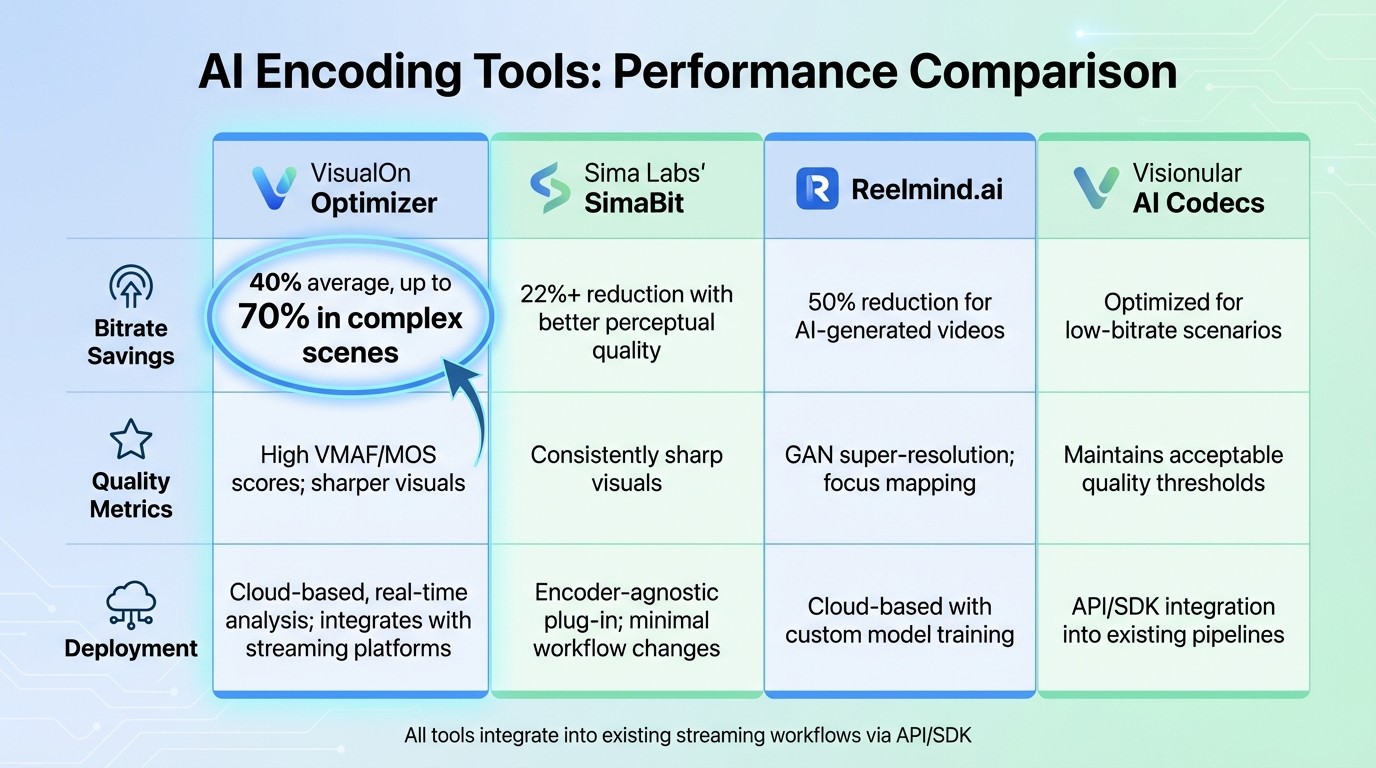
AI Encoding Tools Comparison: Bitrate Savings and Performance Metrics
AI-powered encoding takes video compression to the next level by analyzing each frame and allocating bitrate intelligently. For instance, high-motion scenes are assigned more bitrate to preserve detail, while static backgrounds are compressed more heavily to save bandwidth without compromising quality. This approach not only maintains visual fidelity but also reduces streaming costs significantly. Let’s explore some cutting-edge AI tools that are revolutionizing video encoding.
Sima Labs' SimaBit is an encoder-agnostic plug-in that can cut bandwidth usage by at least 22%. It enhances perceptual quality before encoding with formats like H.264, HEVC, or AV1, ensuring sharper visuals at reduced bitrates.
VisualOn Optimizer adjusts transcoder settings in real time, achieving an average bitrate reduction of 40% and up to 70% for complex scenes, all while maintaining high visual quality.
For videos generated by AI, Reelmind.ai employs neural networks, focus mapping, and GAN-based super-resolution to reduce bitrates by 50%, delivering crisp visuals even at lower file sizes.
Top AI Tools for Video Encoding and Compression
These AI-driven tools are specifically designed to optimize low-bitrate encoding without requiring a complete overhaul of existing workflows.
Visionular AI Codecs: Tailored for low-bitrate applications, these codecs prioritize efficient compression while maintaining quality.
Digital Harmonic Keyframe: Focuses on smart keyframe selection to eliminate redundant data, streamlining video delivery.
Both tools are easily integrated into current streaming pipelines via API or SDK, making them accessible for brands looking to experiment with AI-powered encoding.
Key performance metrics for these tools include VMAF (Video Multimethod Assessment Fusion), which evaluates perceptual video quality on a 0–100 scale, and MOS (Mean Opinion Score), a user-based rating from 1 to 5. These metrics ensure that even with reduced bitrates, video quality remains high, preserving critical details that enhance the viewing experience.
For U.S.-based companies, these bitrate reductions can directly lower CDN egress costs, which are typically billed per gigabyte. For example, cutting the average bitrate by 40% can lead to a proportional 40% savings in data transfer expenses over time.
Comparison Table: AI Encoding Tools
Here’s a quick look at how these tools stack up in terms of bitrate savings, quality, and deployment options:
Tool | Bitrate Savings | Quality Metrics | Deployment Options |
|---|---|---|---|
VisualOn Optimizer | 40% average, up to 70% in complex scenes | High VMAF/MOS scores; sharper visuals | Cloud-based, real-time analysis; integrates with streaming platforms |
Sima Labs' SimaBit | 22%+ reduction with better perceptual quality | Consistently sharp visuals | Encoder-agnostic plug-in; minimal workflow changes |
Reelmind.ai | 50% reduction for AI-generated videos | GAN super-resolution; focus mapping | Cloud-based with custom model training |
Visionular AI Codecs | Optimized for low-bitrate scenarios | Maintains acceptable quality thresholds | API/SDK integration into existing pipelines |
To evaluate the impact of these tools, brands can run A/B tests on sample content like product demos, talking-head videos, or user-generated clips. Experiment with bitrates reduced by 20–50% from your current baseline and measure outcomes using metrics such as VMAF scores, rebuffer rates, and viewer engagement (e.g., watch time and session length). This data can help determine whether AI-powered encoding delivers both technical efficiency and measurable business results.
Using TwinTone for Low-Bandwidth AI Livestreams

TwinTone offers a smart way for brands to run continuous, efficient livestreams. By transforming real creators into AI Twins, it allows for 24/7 streaming that adapts to network conditions. This is especially useful for reaching audiences on mobile devices or in areas with spotty internet connections. The system uses proven AI compression techniques to simplify operations, ensuring consistent engagement around the clock.
Creating AI Twins for 24/7 Streaming
TwinTone simplifies the process of creating an AI Twin in just three steps: choose an AI Avatar from TwinTone's library, upload product visuals and a script, and let the system generate a digital twin ready for seamless streaming. To perform well in low-bandwidth environments, TwinTone relies on AI-powered compression and adaptive bitrate streaming, which significantly reduces the required bitrate. For optimal results, brands should start with high-quality source videos - 1080p at 30 frames per second is ideal - and test their AI Twins in simulated low-bandwidth conditions (below 1 Mbps) to ensure smooth playback before going live.
Scaling Livestreaming with TwinTone
TwinTone makes it easy to run multiple AI Twin streams at once, automatically adjusting video quality in real time. It also supports multilingual streaming, which is a big advantage for reaching diverse audiences in the U.S. With over 40 language options available, brands can connect with a broader range of viewers. For example, around 41 million Americans speak Spanish at home, so brands can stream in both English and Spanish simultaneously, maintaining 720p quality at under 800 kbps. The platform also integrates shoppable links into livestreams, featuring real-time product overlays and calls-to-action that can boost conversion rates by 30–50% through personalized viewer experiences.
Tracking Performance with Built-In Analytics
TwinTone includes real-time analytics dashboards to track key metrics like viewer count, watch time, conversion rates from shoppable videos, and average bitrate per session. These insights show bandwidth usage as low as 500 kbps while maintaining a 90% viewer retention rate, highlighting effective optimization. Analytics can also pinpoint engagement drops caused by latency, helping brands fine-tune their AI Twin scripts and streaming settings. For instance, data might reveal that 24/7 AI-powered streams drive twice the conversions of human-led streams while cutting CDN costs by up to 50% through better bitrate management.
Key Takeaways for Brands
From our analysis of bandwidth usage and AI-driven encoding, some important insights for brands stand out. By leveraging AI, low-bandwidth streaming becomes a strategic advantage. It can slash bitrates by 40–70% without sacrificing visual quality, which significantly reduces CDN costs and makes it easier to reach mobile users and rural communities. Tools like VisualOn Optimizer and Sima Labs achieve these results through real-time content analysis and preprocessing, ensuring bandwidth is used more efficiently.
On top of this, adaptive bitrate streaming plays a key role in improving viewer retention. By adjusting video quality dynamically based on network conditions, it minimizes buffering and keeps viewers engaged.
AI is also making waves in UGC (user-generated content) and creator-led commerce. For example, AI Twins streamline scaling efforts by removing coordination challenges. TwinTone’s AI-powered, around-the-clock livestreams deliver 720p quality at under 800 kbps while also supporting multilingual content. This is a game-changer for connecting with diverse audiences, including the 41 million Americans who speak Spanish at home.
The benefits are clear: lower bandwidth costs, a broader audience reach, and increased engagement create a ripple effect of growth opportunities. To make the most of these advancements, brands should track metrics like average bitrate per session, buffering ratios, and conversion rates. AI encoding consistently delivers significant bitrate reductions while maintaining quality, translating into cost savings and greater market access.
To get started, audit your current bandwidth usage. Then, integrate AI encoding and adaptive streaming technologies into your setup. By 2025, the smartest brands will be those that use these tools to expand their reach and reinvest bandwidth savings into growth initiatives.
FAQs
How does AI help reduce bandwidth usage while maintaining video quality?
AI takes video compression to the next level by analyzing and encoding data in a way that trims unnecessary information while keeping the visuals crisp and clear. Using advanced algorithms, it ensures that even when data transfer is reduced, the video quality remains top-notch.
This makes streaming smoother and less demanding on bandwidth, which is perfect for brands aiming to provide high-quality content without overwhelming data requirements.
What key metrics should brands monitor to improve their streaming performance?
To improve streaming performance, brands should keep an eye on key metrics like viewer engagement (likes, comments, shares), real-time viewership during streams, and audience retention to gauge how long viewers remain interested. It's also essential to track click-through rates and conversion rates to see how well your content encourages actions, as well as stream duration to pinpoint the ideal length for holding attention.
By analyzing these metrics, you can adjust your streaming strategy to strike the right balance between delivering high-quality content and managing bandwidth, all while keeping your audience engaged.
How does AI-driven adaptive bitrate streaming help keep viewers engaged?
AI-powered adaptive bitrate streaming takes the hassle out of watching videos by automatically adjusting the video quality based on the viewer's internet speed. This means smoother playback, fewer interruptions, and less buffering - keeping viewers engaged and frustration-free.
Even with slower internet connections, this technology ensures reliable performance, helping brands deliver a better viewing experience. The result? Happier audiences and stronger relationships between brands and their viewers.