How AI Improves Voice Quality in Real-Time
How to build a futureproof relationship with AI

AI tools now make it possible to improve your voice instantly during live audio streams. By removing background noise, reducing echo, and enhancing clarity in milliseconds, these technologies ensure your audience hears you clearly without delays. Whether you’re hosting a webinar, livestreaming a shopping event, or gaming on platforms like Twitch or YouTube, AI acts as an invisible filter, delivering professional audio quality without requiring expensive equipment or soundproofing.
Key Points:
Noise Suppression: Filters out sounds like typing, fans, or traffic.
Echo Reduction: Minimizes room echo and reverb for clearer speech.
Voice Restoration: Improves weak or compressed audio in real time.
Low Latency: Keeps processing delays under 150ms for smooth interactions.
Applications: Ideal for livestreams, virtual events, gaming, and live shopping.
By combining powerful AI with basic equipment like a quality microphone, you can achieve studio-like sound from any environment, making live content more engaging and professional.
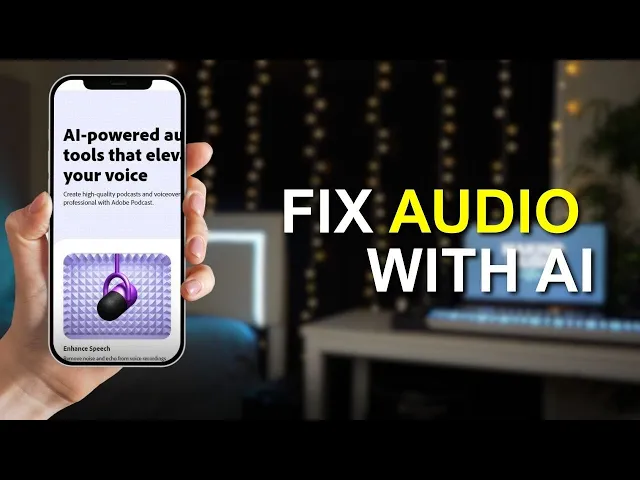
I Tested Adobe's AI Audio Enhancement Tool…

Core AI Technologies Behind Real-Time Voice Enhancement
To meet the demand for crystal-clear live audio, modern AI relies on three main techniques: noise suppression, echo cancellation, and voice restoration. These technologies are powered by deep neural networks that adapt to your environment in real time, differentiating your voice from background noise. Unlike traditional audio filters with rigid rules, these AI systems dynamically adjust to deliver high-quality audio, essential for seamless live interactions.
Noise Suppression and Background Denoising
Deep neural networks trained on vast datasets of real-world audio process sound in ultra-short frames - just 10 to 20 milliseconds. This allows them to separate speech from noise effectively. By analyzing clean speech mixed with everyday sounds like typing, traffic, barking dogs, or HVAC hums, these models learn which signals to remove while keeping your voice natural.
What’s remarkable is how quickly this happens. Within milliseconds, unwanted sounds are filtered out before your audio reaches platforms like Zoom or OBS. This makes AI especially useful for managing unpredictable background noises, like a door slamming or a car honking, which old-school noise gates struggle to handle. For creators in the U.S. working from home offices or shared spaces, this means professional-quality audio without the need for costly soundproofing - perfect for live shopping events where clear audio keeps viewers engaged.
Echo Cancellation and Reverb Reduction
Neural echo cancellation takes audio clarity a step further by tackling room echo and reverb. These systems use both the microphone input and a reference signal - like a remote caller’s voice - to predict and isolate clean speech, effectively minimizing acoustic echo.
For reverb reduction, AI models are trained on pairs of "dry" (non-reverberated) and "wet" (reverberated) speech recorded in different environments. This training allows them to reduce early reflections and late reverberations often found in spaces with hard surfaces, like kitchens or bedrooms. Even in untreated rooms, these models produce tighter, more direct audio. For live shopping events, this means clearer sound that keeps viewers focused and engaged, which can directly influence sales.
Voice Restoration and Clarity Enhancement
Voice restoration is another game-changer, transforming weak or compressed audio into clear, natural speech in real time. Platforms like Whispp leverage this technology to help individuals with voice disorders, such as dysphonia, participate in livestreams or calls. These systems reconstruct missing voicing, smooth out pitch inconsistencies, and refine speech articulation - all without requiring the speaker to slow down or strain.
In addition to restoration, AI can enhance clarity by modulating accents for better comprehension. For example, Sanas offers real-time accent translation, adjusting a speaker's acoustic patterns to make their speech easier for U.S. listeners to understand - all while preserving their unique vocal identity and emotional tone. This reduces the effort needed to follow fast-paced conversations, making it ideal for live shopping or gaming streams. Combined with noise suppression and reverb reduction, these tools deliver studio-quality audio from everyday setups, empowering creators to produce professional content effortlessly. This level of clarity ensures that every word resonates, enhancing engagement and accessibility on live platforms.
How to Set Up AI Voice Enhancement
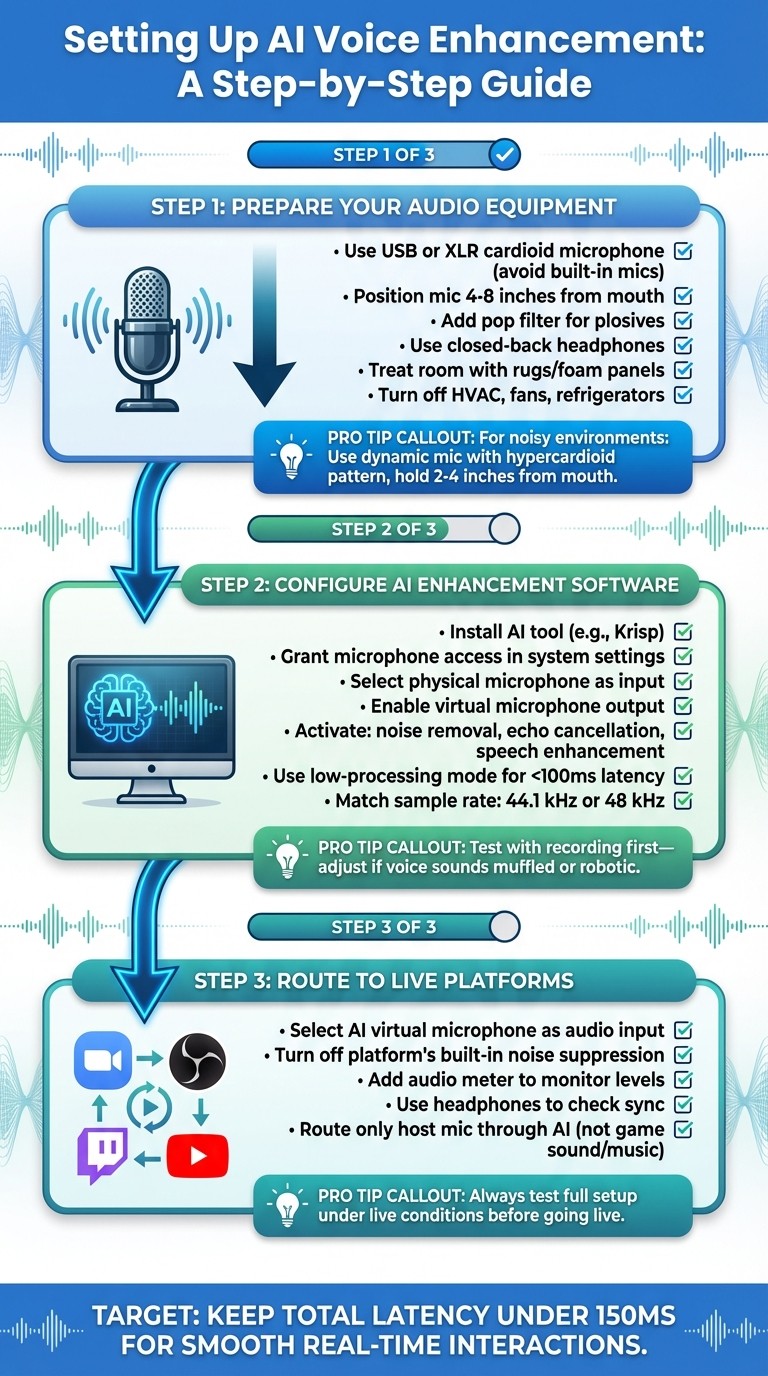
How to Set Up AI Voice Enhancement for Livestreaming: 3-Step Guide
Getting AI voice enhancement up and running requires the right gear, some software adjustments, and proper audio routing. The aim? To deliver clean, professional audio that’s processed by AI tools and sent seamlessly to your streaming or conferencing platform. Let’s break it down step by step.
Preparing Your Audio Equipment and Environment
Start with a quality microphone - either a USB or XLR cardioid model. Avoid built-in mics, as they tend to pick up too much background noise. If you go with an XLR mic, pair it with a solid audio interface in the $100–$200 range for reliable performance. Position your mic 4–8 inches from your mouth, and use a pop filter to cut down on plosives and breath sounds. To improve sound clarity, treat your space with rugs or foam panels to reduce echoes, and wear closed-back headphones to prevent sound bleed that could cause feedback.
In a typical U.S. home office (around 10×12 ft or 12×14 ft), placing sound-absorbing material behind and beside your speaking area can make a big difference. Before you go live, turn off any nearby noise sources like HVAC systems, fans, or refrigerators - AI noise reduction works best when there’s minimal background noise to begin with.
For noisier environments, like retail or warehouse spaces, a dynamic mic with strong off-axis rejection (such as one with a hypercardioid pickup pattern) is your best bet. Hold it closer to your mouth - about 2–4 inches - and point it away from loudspeakers or ambient noise. Once your gear and space are optimized, you’re ready to set up your AI tools.
Configuring AI Voice Enhancement Tools
With your hardware ready, install a real-time AI enhancement app like Krisp or a similar program. During installation, make sure to grant microphone access in your system settings. Then, select your physical microphone - such as a "Shure MV7" or "Focusrite Scarlett" - within the app. The software will create a virtual microphone (e.g., "Krisp Microphone" or "Hance Virtual Mic"), which will appear as an audio device on your system.
Activate features like noise removal, echo cancellation, and speech enhancement. For live applications, use the low-processing mode to keep latency under 100 ms. Test your setup with a quick recording or video call to ensure your voice sounds natural and stays in sync. Match the sample rate (44.1 kHz or 48 kHz) with your streaming software to avoid audio mismatches. If your voice sounds off - like muffled or robotic - adjust the noise suppression settings. If background noise persists, increase the suppression level gradually.
Integrating AI-Processed Audio into Live Platforms
Once your AI tools are active, it’s time to route the enhanced audio to your live platforms. For platforms like Zoom, Twitch, YouTube Live, or OBS Studio, the process is simple once your virtual microphone is set up.
In Zoom or Microsoft Teams, go to the audio settings and choose the AI tool’s virtual mic as your input. Turn off any built-in noise suppression to avoid double-processing your audio. For OBS Studio or Twitch Studio, head to Settings → Audio and select your AI virtual microphone as the Mic/Auxiliary device. Add an audio meter to monitor levels, and use headphones to ensure the audio syncs with your video. When mixing multiple audio sources - such as game sound, music, or guest calls - route only your host mic through the AI tool to prevent over-processing other inputs.
For brands using AI-driven hosts like TwinTone, route the AI voice output through your OBS or RTMP pipeline for consistent and polished audio during shoppable streams. Always test your full setup under live conditions to ensure everything runs smoothly when it matters most.
Optimizing AI Voice Enhancement for Different Scenarios
Adjusting AI Settings for Live Shopping Events
Live shopping requires speech to be crystal clear so viewers can easily catch product details and calls to action. Start by using medium-to-strong noise suppression to eliminate background sounds like HVAC noise, keyboard clicks, or chatter. However, when showcasing products that produce distinct sounds - like the rustle of fabric, button clicks, or the unboxing experience - reduce suppression slightly to maintain authenticity and build trust with your audience. To make speech sharper, enhance the 2–4 kHz frequency range. Adding light compression can help stabilize volume if you move away from the microphone during the broadcast. Always test your settings on multiple devices to ensure your voice remains clear and no important sounds are accidentally filtered out.
Maintaining Low Latency for Real-Time Interactions
Once your audio is optimized for clarity, it’s essential to minimize delay for seamless real-time interactions. Whether hosting Q&A sessions or live auctions, keeping the total audio delay under 150 milliseconds is key to maintaining a natural conversational flow. Choose AI tools specifically designed for real-time processing and enable low-processing presets to reduce latency further. Additionally, a wired Ethernet connection and selecting a nearby server region can significantly cut down delays. Testing your setup with a remote partner beforehand ensures interactions feel immediate and smooth.
Scaling AI Voice Enhancement for Multi-Stream Scenarios
If you're managing multiple livestreams, consistent voice quality across channels becomes critical. Instead of constantly tweaking hardware, consider using cloud-based enhancement APIs. These allow you to allocate individual processing instances for each stream and scale effortlessly as you add more channels. To maintain uniform quality, apply the same audio presets and monitor key metrics like CPU usage, latency, and loudness (aim for around −16 LUFS integrated). For brands like TwinTone, which rely on continuous AI-powered livestreams, this method ensures a consistent voice identity and minimal delays across all broadcasts.
The Future of AI Voice Technology in Social Commerce
AI Voice in Automated Livestreams with TwinTone

AI-powered voice technology is transforming automated livestreams, and platforms like TwinTone are leading the charge. By using AI Twins - digital replicas of real creators - these platforms can host branded livestreams around the clock. These AI Twins not only demonstrate products but also answer viewer questions in real time, delivering an engaging and interactive experience. Thanks to advanced voice-cloning models, they maintain studio-quality sound no matter the environment, ensuring a polished and professional tone that's essential for brands running continuous social commerce campaigns.
For these livestreams to feel natural and interactive, latency must stay under 150–200 milliseconds. This low latency ensures lip-sync accuracy and smooth audience engagement. Additionally, emotion and prosody controls allow the AI host to adapt its tone - expressing excitement during flash sales or providing a calm, detailed explanation during product demos. TwinTone also supports multilingual streams, enabling brands to reach global audiences without the need for separate recordings. This scalability means businesses can run multiple streams tailored to different regions or interests without compromising quality, opening the door to more inclusive and accessible shopping experiences.
Improving Accessibility and Multilingual Capabilities
AI voice technology is also making live shopping more accessible. Features like denoising, echo cancellation, and speech clarity improvements ensure that viewers can hear every word, even in noisy environments. These tools are especially helpful for those who rely on lip reading or hearing aids. Voice restoration can even transform whispers or irregular speech into clear, natural tones in real time, empowering creators with speech impairments to host livestreams confidently. Combined with accent adjustment features, this technology ensures that viewers across the U.S. and beyond can easily follow along.
Real-time language translation, accent conversion, and multilingual text-to-speech take this accessibility even further. A U.S.-based brand, for example, can stream in English while simultaneously offering audio in other languages, complete with localized offers. Automatic speech recognition enables the AI to understand and respond to questions in multiple languages, making global live commerce not just possible but practical. These innovations allow brands to connect with diverse audiences, enhancing their reach and impact.
How Better Audio Drives Engagement and Conversions
Clear, high-quality audio does more than just sound good - it directly impacts viewer engagement and sales. In social commerce, clear speech and reduced background noise encourage viewers to stick around longer. When product benefits, pricing, and instructions are easy to hear - even on mobile speakers - audiences are more likely to stay engaged. This clarity also boosts interaction, with call-to-action phrases like “Tap the bag below to get 20% off today” driving higher click-through rates.
Professional-grade audio builds trust, making shoppers feel like they’re watching a premium broadcast. This trust translates to higher engagement, as viewers are more likely to explore product details, understand sizing or usage instructions, and add items to their cart. Clear communication about discounts, shipping, and limited-time offers helps reduce hesitation, increasing the likelihood of completing a purchase. Additionally, detailed explanations about product care and fit can lower return rates and chargebacks. Many brands report a significant boost in conversions - often in the double digits - when upgrading their livestreams to broadcast-quality audio, especially in categories where trust and product details matter most.
Conclusion
Key Takeaways for Implementing AI Voice Enhancement
For live shopping and social commerce, real-time AI voice enhancement can make a huge difference. Start with a good cardioid USB or XLR microphone, position yourself close to it, and minimize loud background noise. While AI tools can significantly improve audio quality, they can’t fix issues like distorted or clipped signals. Use features like noise suppression, echo cancellation, and clarity enhancement available in tools such as Krisp or Hance to polish your audio.
Low-latency settings are critical - aim to keep the end-to-end audio delay under 150–200 milliseconds for smooth, natural interactions. Adjust your AI profiles based on your environment: stronger noise reduction is ideal for noisy retail spaces, while natural sound settings work better for studio-like streams. Always test your setup on the platform you’ll be using to ensure proper audio levels, sync, and routing through virtual microphones. Finally, track metrics like watch time, chat participation, and conversion rates to measure the impact of AI audio and refine your setup over time. These practices will help you deliver clear, professional audio while keeping costs manageable.
The Role of AI in Scaling Social Commerce
AI voice technology ensures consistent, high-quality audio across multiple streams and creators, eliminating the need for a dedicated audio engineer for every session. Clear audio doesn’t just sound good - it keeps viewers engaged, makes call-to-action phrases more compelling, and builds the trust needed to turn casual viewers into buyers. With tools like TwinTone's AI Twins, brands can run 24/7 livestreams and create on-demand user-generated content (UGC), maintaining broadcast-quality production. This lets companies scale their live content output without requiring a proportional increase in human resources, enabling continuous product demos, live Q&A sessions, and recurring shopping events across time zones and campaigns - all while keeping costs in check.
As AI voice technology advances - offering more precise control over tone, better multilingual support, and seamless integration with commerce platforms - early adopters will have the edge. They’ll attract larger audiences, create more inclusive experiences, and maximize returns on every live shopping session.
FAQs
How does AI separate my voice from background noise in real time?
AI leverages sophisticated algorithms to pick out your voice from the surrounding noise by analyzing audio signal patterns. It identifies speech by recognizing distinct voice frequencies and filters out distractions like traffic, typing, or background music.
This happens instantly, ensuring crisp audio for activities such as livestreams, video production, and virtual meetings. By improving voice clarity, AI helps deliver a polished and more engaging experience for your listeners.
What gear do I need to use AI voice enhancement during live streaming?
To get started with AI-powered voice tools for live streaming, you'll need a few key pieces of equipment:
A dependable microphone: Opt for a high-quality microphone to capture clear audio. Depending on your budget and setup, you can go with a USB microphone or an XLR setup.
A capable computer or device: Make sure your device can handle AI-driven software or platforms that process voice improvements in real time.
A stable internet connection: A strong and consistent connection is essential for smooth live streaming and uninterrupted real-time audio processing.
Some AI tools might also integrate directly with your streaming platform or hardware, so it's worth checking if they're compatible with your current setup. With these essentials in place, you're ready to elevate your live streams with enhanced audio quality powered by AI.
How does AI enhance voice quality and boost engagement during live shopping events?
AI-powered voice technology is transforming live shopping by offering crystal-clear, natural-sounding audio in real time. This creates an engaging and polished environment that keeps viewers tuned in and attentive.
Platforms such as TwinTone elevate this experience by introducing AI-driven hosts capable of interacting directly with the audience. These hosts can answer product questions instantly and deliver smooth, real-time product demonstrations. The result? A more interactive and responsive shopping experience that captivates viewers and boosts sales.